PostgreSQL Sharding vs Partitioning: Which Scaling Strategy Fits Your Workload?
As a PostgreSQL database grows, queries slow down, maintenance windows stretch, and storage bills climb. Two techniques come up in almost every scaling conversation: partitioning and sharding. They sound similar, but they solve different problems and carry very different costs. This guide explains how each one works, what happens to read and write performance, and how to decide between them. It includes working SQL you can adapt to your own schema.
What Is PostgreSQL Partitioning?
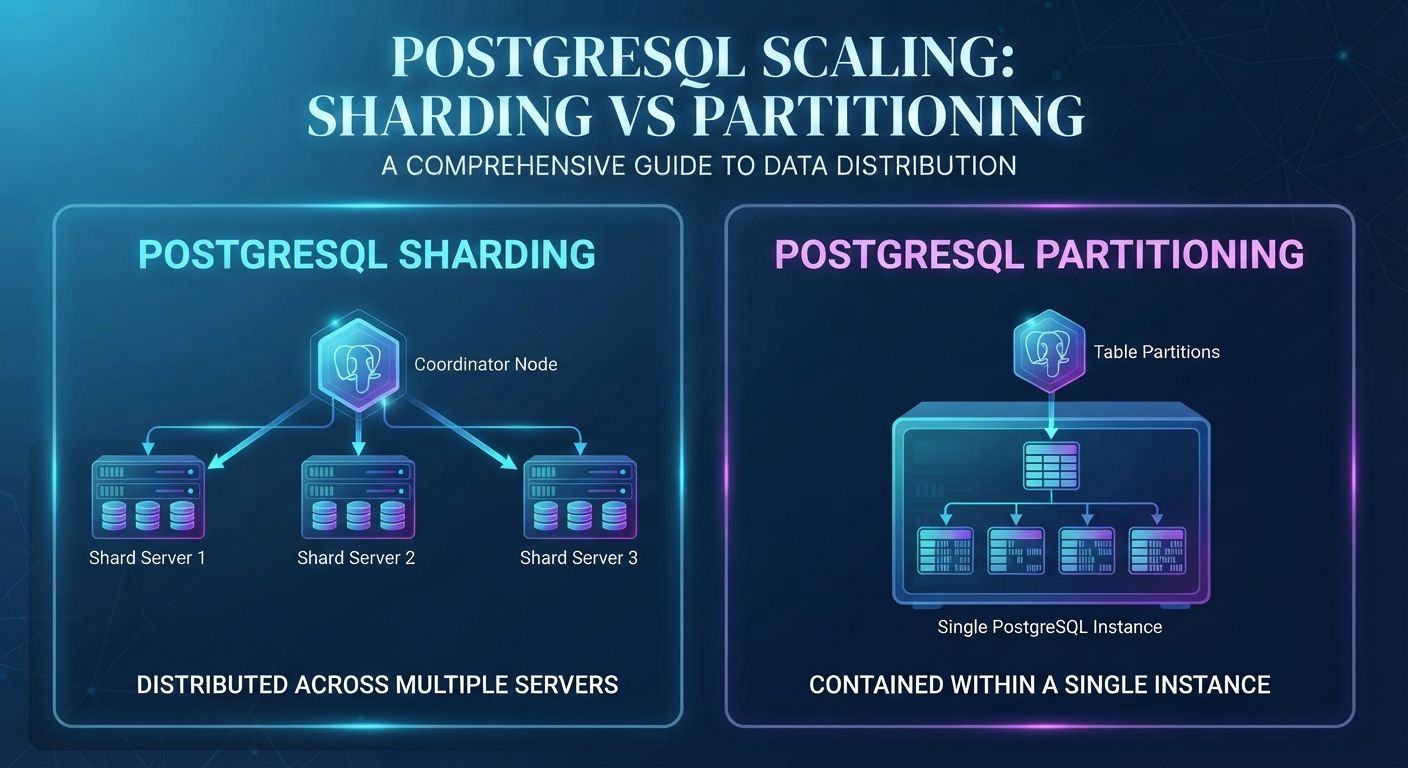
Partitioning splits one large table into smaller physical pieces inside a single PostgreSQL instance. Your application still queries one logical table, and the planner decides which pieces to read. PostgreSQL supports range, list, and hash partitioning natively through declarative syntax.
The main benefit is partition pruning. When a query filters on the partition key, such as a date range, the planner skips every partition that cannot contain matching rows. Indexes also stay smaller, vacuum runs on smaller chunks, and old data can be removed by detaching or dropping a partition instead of running a slow bulk delete.
The limit is that everything still lives on one server. Partitioning improves organization and query efficiency, but it does not add CPU, memory, or disk throughput.
What Is Sharding in PostgreSQL?
Sharding spreads data across multiple database servers, called shards. Each shard holds a subset of the rows, usually chosen by a shard key such as customer ID or tenant ID. Because each server handles only part of the data, you can scale write throughput and total storage beyond what one machine can deliver.
PostgreSQL has no built-in automatic sharding. Teams typically combine declarative partitioning with the postgres_fdw foreign data wrapper, use an extension such as Citus, or route queries in the application layer. Each approach moves complexity out of the database engine and into your architecture.
Read and Write Performance: What to Expect
Benchmark numbers for these two techniques vary widely because results depend on row size, indexes, hardware, and query shape. Rather than quoting figures that will not match your system, here is how each approach behaves in practice.
Partitioning mostly helps reads that filter on the partition key. A query for last week’s orders touches one small partition instead of scanning a huge table. Queries that ignore the partition key may scan every partition and can run slower than before. Write throughput stays roughly the same because all inserts still hit one server, although smaller indexes can reduce write overhead.
Sharding helps both reads and writes when queries include the shard key, because the request goes to one shard and each shard carries a fraction of the load. Cross-shard queries, joins, and transactions are the weak point. They require network round trips and extra coordination, which increases latency.
To measure the difference on your own data, use pgbench with custom scripts that mirror your real queries, and record transactions per second and 95th percentile latency before and after each change. Test with production-sized data, since small datasets hide the problems both techniques are meant to solve.
Cost Trade-Offs
Partitioning is the cheaper option. It needs no new servers, and the main cost is engineering time to design the partition key and automate partition creation. Retention also gets cheaper because dropping an old partition frees space immediately.
Sharding adds infrastructure and operational cost. You pay for multiple servers, replicas for each shard, cross-node backups, monitoring, and a rebalancing plan for when one shard grows faster than the others. Schema changes must be rolled out consistently everywhere. These costs are justified when a single server can no longer keep up, but they are hard to reverse. For broader guidance on controlling infrastructure spend, read our guide to AWS vs Azure vs GCP cloud cost optimization.
Partitioning Example: Monthly Range Partitions
This example partitions an orders table by month. In PostgreSQL, the partition key must be part of the primary key.
CREATE TABLE orders (
idbigint GENERATED ALWAYS AS IDENTITY,
customer_id bigint NOT NULL,
created_attimestamptz NOT NULL,
totalnumeric(12,2) NOT NULL,
PRIMARY KEY (id, created_at)
) PARTITION BY RANGE (created_at);
CREATE TABLE orders_2026_10 PARTITION OF orders
FOR VALUES FROM ('2026-10-01') TO ('2026-11-01');
CREATE TABLE orders_2026_11 PARTITION OF orders
FOR VALUES FROM ('2026-11-01') TO ('2026-12-01');
CREATE INDEX ON orders (customer_id, created_at);
Queries that filter on created_at now read only the matching partition. To retire old data without a heavy delete, detach the partition and drop it.
ALTER TABLE orders DETACH PARTITION orders_2026_10 CONCURRENTLY;
DROP TABLE orders_2026_10;
Create future partitions ahead of time with a scheduled job, such as pg_cron or your deployment pipeline, so inserts never fail because a date range is missing.
Sharding Example: Hash Partitions on Foreign Servers
This pattern routes rows by customer ID to remote PostgreSQL servers using postgres_fdw. The second server (shard2) is defined the same way as shard1.
CREATE EXTENSION postgres_fdw;
CREATE SERVER shard1 FOREIGN DATA WRAPPER postgres_fdw
OPTIONS (host 'shard1.internal', dbname 'app', port '5432',
use_remote_estimate 'true');
CREATE USER MAPPING FOR app_user SERVER shard1
OPTIONS (user 'app_user', password 'change_me');
CREATE TABLE events (
customer_id bigint NOT NULL,
event_idbigint NOT NULL,
payloadjsonb
) PARTITION BY HASH (customer_id);
CREATE FOREIGN TABLE events_p0 PARTITION OF events
FOR VALUES WITH (MODULUS 2, REMAINDER 0) SERVER shard1;
CREATE FOREIGN TABLE events_p1 PARTITION OF events
FOR VALUES WITH (MODULUS 2, REMAINDER 1) SERVER shard2;
Each foreign partition points to a matching table that must already exist on the remote server. Queries that include customer_id are pruned to a single shard. Unique constraints are only enforced within each shard, so choose keys carefully and avoid cross-shard foreign keys.
Configuration Tips
- Keep enable_partition_pruning on (it is the default) and confirm pruning with EXPLAIN.
- Avoid creating thousands of partitions, since planning time grows with partition count.
- For postgres_fdw, set use_remote_estimate so the planner makes better cost decisions, and consider async_capable on foreign servers for parallel remote scans.
- Index the shard key and your most common filters on every shard.
How to Choose Between Sharding and Partitioning
Start with partitioning. If your pain comes from large tables, slow date-based queries, bloated indexes, or retention cleanup, partitioning solves it at low cost and low risk. Move to sharding only when you can show that a well-tuned single server, with read replicas and sensible vertical scaling, cannot handle your write volume or storage. Common signals include sustained write saturation, a dataset that no longer fits on one machine, or strict tenant isolation requirements.
Many teams use both: each shard is partitioned by time so that every server stays manageable. Whichever route you take, plan the shard key early because changing it later is expensive. High-growth products in SaaS and transaction-heavy platforms in fintech often reach this decision first.
Conclusion
Partitioning organizes data on one server, while sharding distributes it across many. Partitioning is the sensible first step, and sharding is a deliberate investment for workloads that outgrow a single machine. If you are planning a database scaling project, our cloud and DevOps services team can review your architecture. If you need extra engineering capacity to deliver it, compare in-house developers vs staff augmentation, or contact DevLogix to discuss your requirements.