How Video Streaming Works: Codecs, Containers and Delivery Explained
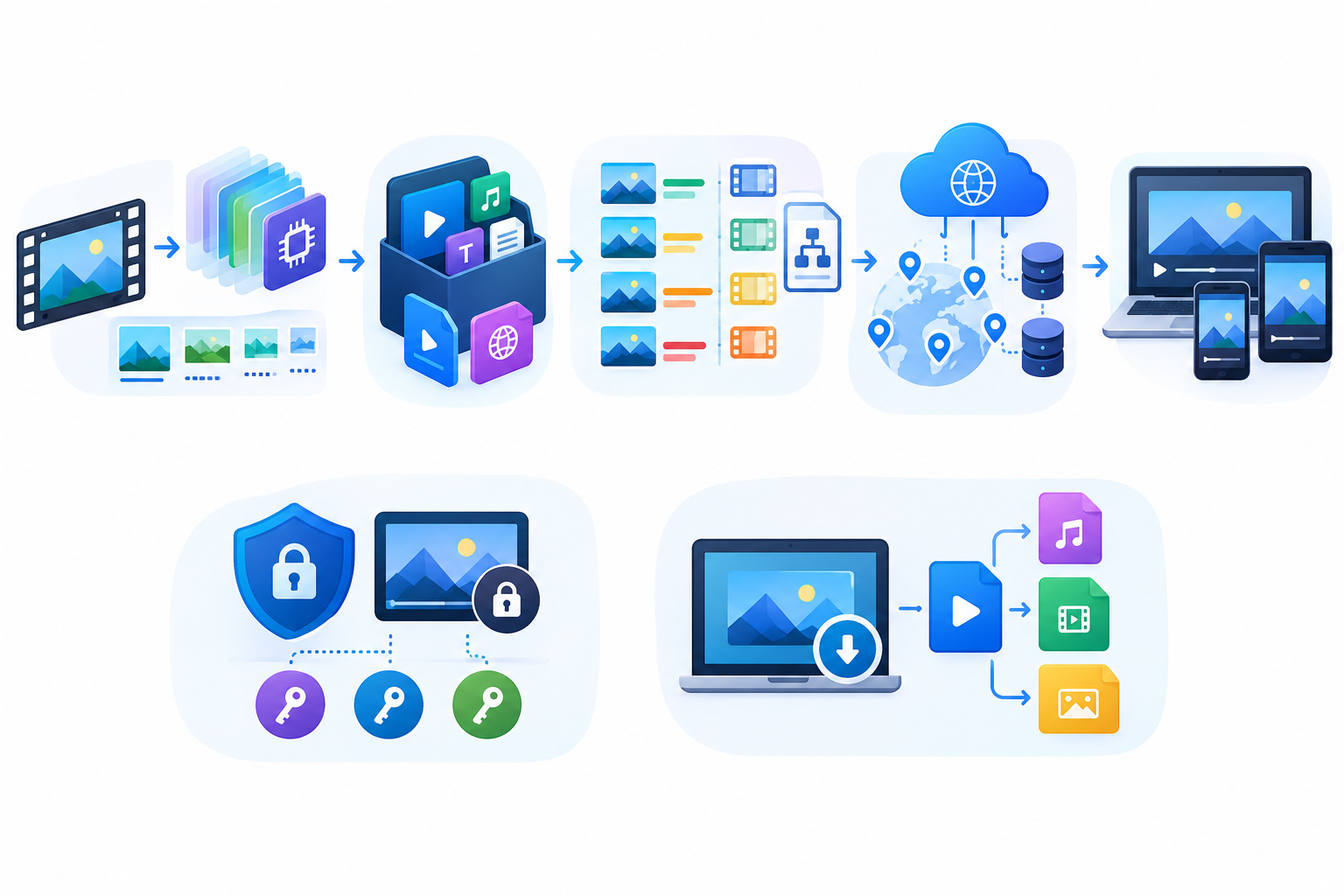
Press play on a video and it usually starts within a second or two, adjusts its quality when your signal weakens, and rarely stalls. That smooth experience hides a surprising amount of engineering. Before a single frame reaches your screen, the footage has been compressed, packaged, sliced into small pieces, stored, cached in several locations, and reassembled by a player on your device.
For product teams building anything with video, such as a training portal or a SaaS dashboard with recorded demos, understanding this pipeline leads to better decisions about cost, speed, and user experience. This guide walks through the main parts in plain language.
Step 1: Compression With Codecs
Raw video is enormous. A few minutes of uncompressed footage can fill a large share of a laptop’s storage, so every video you watch has been compressed by a codec, short for coder-decoder. A codec is a set of rules for shrinking video by discarding detail the eye is unlikely to miss and by storing only what changes between frames rather than every frame in full.
Several codecs are common today. H.264, also known as AVC, plays almost everywhere. HEVC (H.265) compresses more efficiently but comes with more complicated licensing. VP9 was developed by Google and is widely used on the web. AV1 is a newer, royalty-free option that compresses very well but demands more computing power to encode.
The trade-off is consistent. Stronger compression means smaller files and lower bandwidth bills, but it often means slower encoding and a need for newer devices to decode the result. Many teams keep H.264 as a dependable fallback and add newer codecs for devices that support them.
Step 2: Packaging Inside a Container
Codecs and containers are often confused. The codec compresses the content, while the container is the file format that bundles the compressed video, audio, subtitles, and metadata together. MP4 and WebM are the two most familiar containers on the web. An MP4 file might hold H.264 video with AAC audio, while a WebM file commonly pairs VP9 or AV1 video with Opus audio. MP3, by contrast, is an audio-only format, which is why audio versions of recordings are usually saved that way.
The distinction matters in practice. If a player supports a container but not the codec inside it, the video will not play even though the file extension looks right.
Step 3: Adaptive Bitrate Streaming
Sending one large file to every viewer works badly. Someone on fast fiber and someone on a weak mobile connection need very different things, so modern platforms use adaptive bitrate streaming. The video is encoded at several quality levels, and each version is cut into short segments, often just a few seconds long. A manifest file lists every segment and quality option.
Two protocols dominate this space: HLS, created by Apple, and MPEG-DASH, an open standard. The player downloads the manifest, starts at a modest quality, measures how quickly segments arrive, and moves up or down as conditions change. That is why a video can look soft for a moment and then sharpen. Viewers rarely notice the switch.
Step 4: Storage and Content Delivery
Those segments need a home and a fast route to viewers. Origin storage holds the master copies, while a content delivery network (CDN) caches popular segments at locations close to the audience, reducing delay and taking pressure off your origin.
Cost is where many projects get a surprise. Storing video is usually inexpensive, but delivering it to viewers adds up as the audience grows. Choosing a provider and a caching approach early can change the monthly bill noticeably. If you are weighing platforms, this comparison of AWS, Azure, and GCP cost optimization is a useful starting point, and a team offering cloud and DevOps services can help set up storage, caching, and monitoring so that costs are measured rather than guessed.
Step 5: Playback in the Browser
On the viewer’s side, the player does the heavy lifting. It reads the manifest, fetches segments, decodes them, and keeps audio and video in sync. Browsers provide a built-in video element and, through the Media Source Extensions API, let JavaScript feed segments to the decoder. Most teams rely on an established player library instead of writing this logic from scratch.
The player is also part of your page performance story. Heavy scripts, oversized poster images, and autoplaying embeds can slow a page down before anyone presses play. Loading the player only when it is needed and showing a lightweight preview image are simple habits that help. Teams building video-heavy interfaces can look at how enterprise Next.js and React development is approached at scale, or work with a web development team to keep playback fast on every device.
Rights, Licensing, and Protection
Not all video is free to copy. Commercial platforms often use DRM systems such as Widevine, FairPlay, and PlayReady to encrypt streams so that only authorized players can decode them. Even without DRM, most videos carry copyright and platform terms. Anyone building or using video features should know what they are allowed to save, reuse, or share. Your own recordings, material under open licenses, and content whose owner has given permission are the clear cases. Anything else deserves a check first.
Why Offline Copies and Format Conversion Still Matter
Streaming is not always the right answer. Field teams working with unreliable connectivity, trainers running workshops in rooms without good internet, and editors who need a reference clip in another format often need a local copy of a video they have the right to use. That is why lightweight online utilities for saving and converting media remain popular. A simple browser-based media saver can turn a link into an MP4 or MP3 file in a few clicks, which is handy when you want an audio-only version of your own webinar for a podcast feed or a compact copy for a slow connection.
SaaS products face the same need from a different angle. Customers often ask to export recorded demos or training sessions, so planning for format options and offline access early is easier than retrofitting it later. Teams building video features into a SaaS platform can explore the SaaS industry page for more context.
A Quick Checklist Before You Build
Before adding video to a product, work through these questions:
- Which devices and browsers must you support, and which codecs do they decode?
- Do you need adaptive streaming, or are short clips enough as plain MP4 files?
- Where will files be stored, and how will delivery costs be monitored?
- Do users need offline access or downloadable exports, and are the rights in place to allow it?
- How will you protect content that should not be freely copied?
Final Thoughts
Video streaming looks simple from the viewer’s chair, but every smooth playback depends on careful choices about codecs, containers, delivery, and licensing. Getting those choices right early keeps costs predictable and viewers happy.
If you are planning a video-enabled product and want experienced engineers to help with architecture, cloud setup, or front-end performance, the DevLogix team is ready to help. Contact DevLogix to talk through your project.