Enterprise Vector Database Comparison 2026: Speed, Latency, and Cost Benchmarks for Modern Engineering
Choosing a vector database is now an infrastructure decision, not a library choice. A wrong pick shows up later as a p99 latency that misses your SLA, a cloud bill that grows faster than traffic, or a re-indexing project nobody scheduled.
Short answer: at roughly 10 million vectors, published third-party tests place Qdrant, Milvus and Pinecone in the low double-digit millisecond range for p99 latency, with Weaviate slightly behind and PostgreSQL with pgvector further back unless heavily tuned. Cost tells a different story. A managed 10-million-vector index lands between about $65 and $135 per month at low traffic, and a read-heavy pattern can multiply that. This guide compares five engines on latency, price and scaling limits, shows the code that matters, and ends with a protocol for benchmarking on your own data.
What Is an Enterprise Vector Database?
An enterprise vector database stores high-dimensional embeddings and returns the nearest neighbours to a query vector using approximate nearest neighbour (ANN) indexes such as HNSW or IVF. Enterprise use adds requirements that prototypes skip: metadata filtering, multi-tenancy, role-based access control, backups, high availability and predictable tail latency under load.
Quick Answer: Which Vector Database Is Best in 2026?
- Lowest tail latency with heavy filtering: Qdrant.
- Billion-scale, distributed, GPU-accelerated indexes: Milvus.
- Built-in hybrid vector plus keyword search: Weaviate.
- Zero-ops managed service with usage billing: Pinecone.
- Existing PostgreSQL stack, under about 50M vectors, need joins and ACID: pgvector.
How We Frame the Benchmarks
Every number in this article refers to one reference workload: 10 million vectors at 1,536 dimensions (the size of common OpenAI-style embeddings), about 1 KB of metadata per record, Recall@10 of at least 0.95, sustained load of 100 to 300 queries per second, and a p99 target under 100 ms.
We report p99 rather than average latency because averages hide the slow queries users actually notice. We pin recall because latency without recall is meaningless: any engine is fast if it is allowed to return poor matches.
A caution on sources. The figures below are compiled from public third-party comparisons and academic papers published in 2025 and 2026. They are not DevLogix lab runs. Vendors publish tests that favour their own engine, and hardware differs between studies, so treat each figure as a directional range and use the protocol later in this article to reproduce it.
Engine-by-Engine Breakdown
Qdrant: Lowest Reported Tail Latency
Qdrant is written in Rust. In the 10M-vector comparisons we reviewed, it reports p99 near 12 ms, against roughly 16 ms for Weaviate and 18 ms for Milvus in the same test. Payload filtering runs inside HNSW traversal, which is why filtered queries hold up better than designs that filter after retrieval.
Watch for: a benchmark authored by Timescale, a competitor with a stake in the result, measured only 41 QPS at 99% recall on 50M vectors. Test beyond 10M before you commit. Choose Qdrant when p99 and filtering dominate your requirements.
Milvus: Built for Distributed Scale
Milvus separates storage, query and index responsibilities, which suits deployments in the hundreds of millions to billions of vectors. It offers the widest range of index types, including GPU-accelerated ones, and reports roughly 15 to 18 ms p99 at 10M. The cost is operational: expect Kubernetes, a metadata store, object storage and a message queue. Zilliz Cloud removes that burden at a quoted price.
Weaviate: Native Hybrid Search
Weaviate fuses vector similarity and BM25 keyword ranking in a single query, which helps when users search with product codes, names or acronyms that embeddings blur. Reported p99 sits around 16 to 25 ms at 10M. An academic scaling study found one HNSW graph per shard and throughput that flattened around 32 virtual cores, so scale by adding shards, not bigger machines. Without quantization, Weaviate Cloud was the priciest option at about $135 per month for 10M vectors; binary quantization reportedly cuts that about fivefold.
Pinecone: Managed, Usage-Billed
Pinecone removes operations entirely. The Standard plan has a $50 monthly minimum, then $0.33 per GB of storage, $4 per million write units and $16 per million read units. Enterprise starts at $500 per month with $6 and $24 per million and a 99.95% SLA. Reported serverless p99 is about 18 ms at 10M.
The billing detail that surprises budgets: a query consumes one read unit per GB of the namespace it searches, with a 0.25 minimum. If a 10M by 1,536 namespace occupies about 61 GB, each query uses roughly 61 read units, close to $0.001, or about $980 per million queries. Split the same data into 100 tenant namespaces of about 0.6 GB and the cost falls to roughly $10 per million queries. Stored size differs from raw vector size, so confirm with Pinecone's cost calculator.
pgvector: Vectors Inside PostgreSQL
pgvector adds vector types and HNSW and IVFFlat indexes to PostgreSQL, so you keep transactions, joins and your existing backups. Reported p99 ranges from 25 to 40 ms in light tests to 85 ms or more in three-node 10M tests, and it depends heavily on index tuning and RAM. Timescale reported that pgvectorscale reached 471 QPS at 99% recall on 50M vectors, but that is again a vendor-authored result. Choose pgvector when vectors sit beside relational data, volume stays under about 50M, and your team already runs Postgres.
Three Levers That Change Your Latency and Cost
1. Memory and Quantization
Raw float32 storage for 10 million vectors at 1,536 dimensions is 61.4 GB (10,000,000 x 1,536 x 4 bytes). Scalar int8 quantization cuts that to about 15.4 GB, and binary quantization to about 1.9 GB. Recall drops, but rescoring the top candidates with the original vectors recovers most of it. Keep quantized vectors in RAM and originals on disk.
2. HNSW Parameters
The parameter m sets graph connectivity, ef_construction sets build quality, and ef_search (hnsw_ef in Qdrant) sets how widely each query explores. Raising ef_search raises recall and latency together. Start at m=16 and ef_construction=200, then sweep ef_search from 64 to 256 while plotting Recall@10 against p99.
3. Filtering Strategy
Filtered search is where engines diverge most. Engines that filter during graph traversal keep latency stable. Engines that filter after retrieval must over-fetch, so latency climbs as filters narrow. In pgvector, enable iterative index scans (version 0.8.0 and later) so restrictive filters do not return fewer than k results.
Reference Architecture for Production RAG
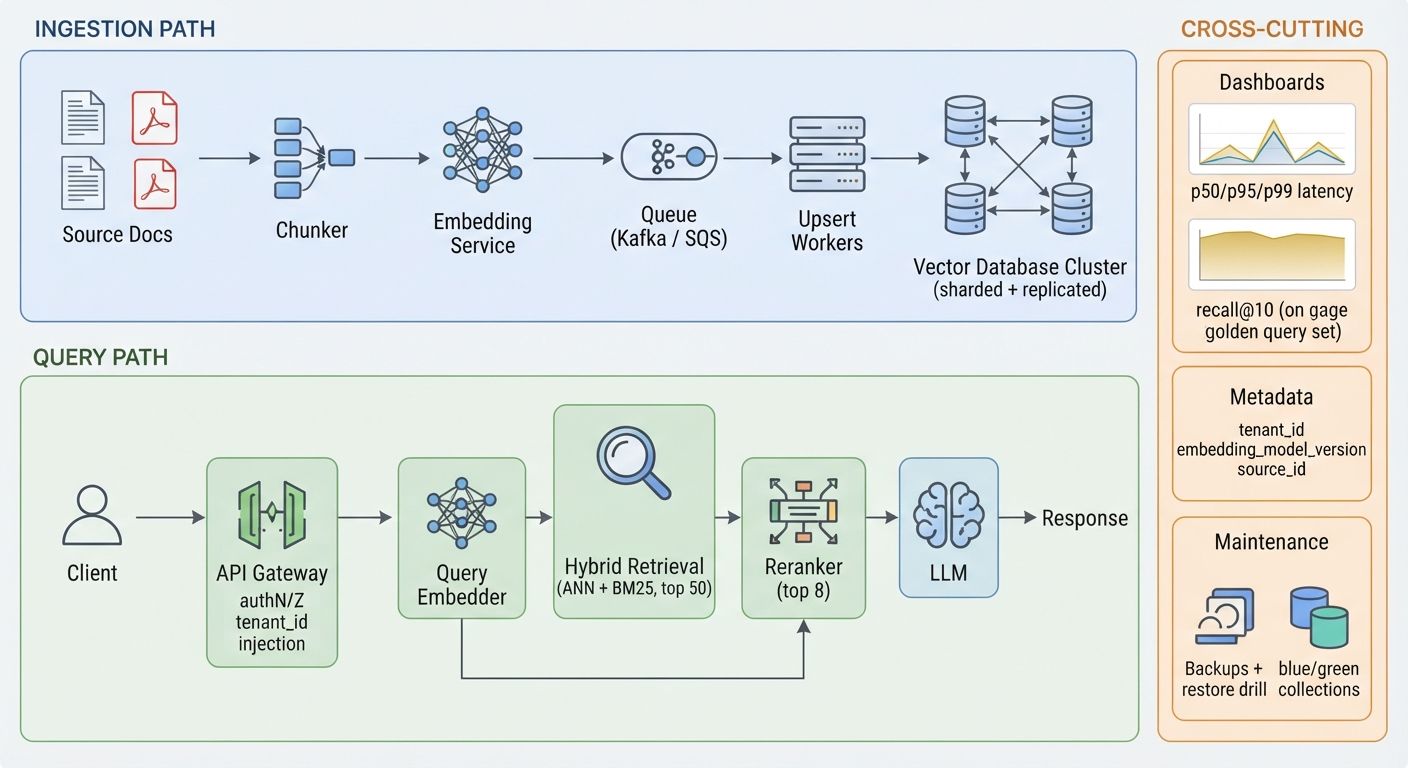
The ingestion and query paths we use as a starting point. Render it as an architecture diagram in the CMS using the text below as the source.
INGESTION PATH
Source docs > Chunker > Embedding service > Queue (Kafka / SQS)
> Upsert workers > Vector DB (sharded + replicated)
QUERY PATH
Client > API gateway (authN/Z, injects tenant_id) > Query embedder
> Hybrid retrieval (ANN + BM25, top 50) > Reranker (top 8) > LLM > Response
CROSS-CUTTING
Dashboards: p50/p95/p99, recall@10 on a golden query set
Metadata on every vector: tenant_id, embedding_model_version, source_id
Backups + restore drill, blue/green collections for re-embedding
Three decisions matter more than the engine choice. First, put tenant_id in every payload and inject it at the gateway, never from the client. Second, tag every vector with its embedding model version so you can re-embed into a parallel collection and switch traffic without downtime. Third, budget latency per hop, because retrieval, reranking and generation each spend part of the same p99 target. Teams that want this pipeline designed and load-tested usually bring in custom AI and machine learning development to own retrieval quality and latency budgets end to end.
Code Snippets: Create and Query
Qdrant: Filtered Search With int8 Quantization and Rescoring
from qdrant_client import QdrantClient, models
client = QdrantClient(url="https://qdrant.internal:6333", api_key=API_KEY)
client.create_collection(
collection_name="docs",
vectors_config=models.VectorParams(size=1536, distance=models.Distance.COSINE),
hnsw_config=models.HnswConfigDiff(m=16, ef_construct=200),
quantization_config=models.ScalarQuantization(
scalar=models.ScalarQuantizationConfig(
type=models.ScalarType.INT8, quantile=0.99, always_ram=True
)
),
)
hits = client.query_points(
collection_name="docs",
query=query_vector,
query_filter=models.Filter(must=[
models.FieldCondition(key="tenant_id", match=models.MatchValue(value="acme"))
]),
search_params=models.SearchParams(
hnsw_ef=128,
quantization=models.QuantizationSearchParams(rescore=True),
),
limit=10,
).points
pgvector: HNSW Index With Tenant Filter
CREATE EXTENSION IF NOT EXISTS vector;
CREATE TABLE docs (
idbigserial PRIMARY KEY,
tenant_id integer NOT NULL,
bodytext,
embedding vector(1536)
);
CREATE INDEX docs_embedding_hnsw ON docs
USING hnsw (embedding vector_cosine_ops)
WITH (m = 16, ef_construction = 200);
SET hnsw.ef_search = 100;
SET hnsw.iterative_scan = relaxed_order;-- pgvector 0.8.0+
SELECT id, body
FROM docs
WHERE tenant_id = 42
ORDER BY embedding <=> $1
LIMIT 10;
How to Benchmark Your Own Workload
Public numbers narrow the shortlist. Your data decides the winner. Use ANN-Benchmarks or the open-source VectorDBBench harness, and follow these steps.
- Freeze a dataset: 1M to 10M real production embeddings and at least 1,000 real queries, with ground truth from exact brute-force search. Real embeddings cluster; random vectors flatter every engine. Your data science and model evaluation services partner can build this golden set.
- Fix the recall target first (Recall@10 of 0.95 or higher) and tune each engine to reach it. Compare latency only at equal recall.
- Run sustained load for 30 minutes or more at 100 to 300 QPS and record p50, p95 and p99, never only the mean.
- Test filtered queries at 1%, 10% and 50% selectivity, and hybrid queries if you use keyword search.
- Inject failures: kill a node, trigger a re-index and restore a backup. Record recovery time.
- Compute cost per million queries at your real QPS, including replicas and egress.
Common Mistakes When Choosing a Vector Database
- Benchmarking with random vectors. Results will not transfer to clustered production data.
- Comparing latency at different recall. A faster engine may simply be returning worse matches.
- Ignoring re-embedding cost. Switching embedding models means re-indexing every vector.
- Sizing for average traffic. Size for peak QPS and for rebuilds while serving traffic.
- Underestimating self-hosted operations. High availability, upgrades and restore drills for Milvus or Qdrant clusters are real cloud and DevOps engineering work, not a weekend task.
Frequently Asked Questions
Which vector database has the lowest latency in 2026?
In the public 10-million-vector comparisons we reviewed, Qdrant reports the lowest p99 latency at about 12 ms, ahead of Weaviate at about 16 ms and Milvus at about 18 ms. Results depend on hardware, recall target and filters, so confirm with a test on your own embeddings before deciding.
Is pgvector good enough for production?
Yes, for many workloads. pgvector suits teams already running PostgreSQL with under roughly 50 million vectors, because it adds ACID transactions and joins. Expect higher and less predictable p99 latency than purpose-built engines, and plan for careful HNSW tuning and enough RAM to hold the index.
How much does a vector database cost at 10 million vectors?
Third-party estimates for 10 million 768-dimension vectors at low query volume range from about $65 per month on Qdrant Cloud and $70 on Pinecone to $120 on PostgreSQL via RDS and $135 on Weaviate Cloud without quantization. Read-heavy workloads cost more, especially on usage-billed services.
How much memory do 10 million 1,536-dimension vectors need?
Raw float32 vectors need about 61.4 GB (10,000,000 x 1,536 x 4 bytes), before index overhead. Scalar int8 quantization reduces that to about 15.4 GB, and binary quantization to about 1.9 GB, at some cost in recall that rescoring can largely recover.
Should I self-host or use a managed vector database?
Use managed when your team has no capacity for on-call, upgrades and backups. Self-host when data residency, cost at sustained high QPS or custom tuning matter more. The break-even depends on query volume, so model cost per million queries at your real traffic.
Book an AI Architecture Audit
Benchmarks from other teams cannot tell you what your embeddings, filters and SLA will do. A DevLogix engineer will review your retrieval workload (vector count, dimensions, QPS, filter patterns and latency target) and return a benchmarked recommendation with a cost model and a migration plan.
Book your AI architecture audit and get an engineer-reviewed shortlist within your first working session.